
Headphones
Showing all 4 results
-
Headphones, JBL Headphones, Mobile Accessories
JBL JR310 Blue JBLJR310BLU
0 out of 5(0)- Dynamic Driver: 32mm/1.25
- Frequency Response: 20Hz – 20kHz
- Impedance: 32 ohm
- Sensitivity: 80dB SPL @ 1kHz/1mW
- Maximum SPL: 80dB
- Microphone Sensitivity: -40 ± 3dVB @1kHz/Pa
- Plug: 3.5mm audio jack
- Maximum Operation Temperature: 45°C
- Weight: 105g/0.231 lbs
SKU: n/a -
Headphones, JBL Headphones, Mobile Accessories
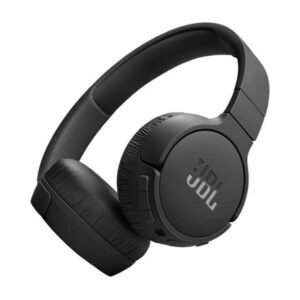
JBL TUNE 720NC BLACK JBLT720NCBLK
0 out of 5(0)- JBL PURE BASS SOUND: The JBL Tune 720BT utilizes the renowned JBL Pure Bass sound, the same technology that powers the most famous venues all around the world.
- UP TO 76H BATTERY LIFE: Get the most out of your entertainment with up to 76 hours of wireless listening pleasure, and easily recharge the battery in as little as 2 hours using the convenient Type-C USB cable.
- QUICK CHARGE: Running low on battery? With a quick 5-minute recharge, you can get an additional 3 hours of music playback to keep the beats going
- JBL HEADPHONES APP: By downloading the JBL Headphones app, you can personalize the sound of your Tune 720BT headphones according to your preferences with ease, using the EQ settings. Moreover, the app offers voice prompts in your desired language to guide you through the different headphone features
- BLUETOOTH 5.3: Wirelessly stream high-quality sound from your smartphone without messy cords with the help of the latest Bluetooth technology
SKU: n/a -
Headphones, JBL Headphones, Mobile Accessories
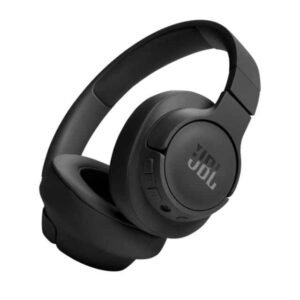
JBL TUNE 770NC BLACK JBLT770NCBLKU
0 out of 5(0)- Noise Cancelling wireless headphones deliver on that promise all day
- 70 hours of battery life
- Lightweight, and flat-folding
- Connect with two Bluetooth® devices simultaneously
- voice prompts in your language will guide you through the features
SKU: n/a


Showing all 4 results
Headphones in Pakistan — Wired, Wireless, Bluetooth & Gaming Headsets
Shop Headphones at Emirates Electronics
What you’ll find here
Whether you’re upgrading for daily calls, lectures, or immersive music, our Headphones category brings everything under one roof. Explore over-ear and on-ear headphones in both wired and wireless options, plus Bluetooth headsets, noise-cancelling (ANC) models, and gaming headsets with crystal-clear mics. Prefer slim, portable designs for commuting on Karachi’s routes? Consider lightweight on-ear or compact over-ear models that fold flat into a backpack. Want maximum comfort for longer study sessions during exam season? Prioritize plush over-ear cushions with a relaxed clamping force and breathable pads.
We curate options for different needs: work/study with mic, fitness and travel, console/PC gaming, and home listening. Each product page highlights the essentials—fit, mic details, battery life (for wireless), cable type (for wired), and basic compatibility—so you can quickly match a pair to your routine without scrolling through jargon.
Easy help from a real store
Have a quick question before you order? Call or WhatsApp 0339 2009000. You can also visit us at Office No 206, 2nd Floor, Seema Electronics Centre, Abdullah Haroon Road, Saddar, Karachi. If you prefer to try the fit or check clamp pressure in person, ask our team for guidance on ear-pad materials, sizes, and headband adjustments. For online orders, our product cards show live availability; if something’s temporarily out of stock, message us and we’ll suggest close alternatives with similar sound or features.
Genuine products, local warranties
We aim for authentic stock with brand or seller warranty where applicable. Warranty terms can vary by model and brand; the most accurate details are shown on the individual product page at checkout. If you need help filing a claim or confirming what’s covered (pads, cable, battery), our team can walk you through typical timelines and documents required in Pakistan.
Headphones Price in Pakistan — How pricing works (2025)
What changes the price
Headphone pricing in Pakistan can vary week to week, and even shop to shop. The biggest factors include: build & comfort (adjustable headbands, metal yokes, swivelling cups, ear-pad material), drivers & tuning (enclosure design matters more than driver size alone), mic quality (noise reduction and speech pickup), ANC & app features (transparency, EQ, firmware updates), battery & charging (fast-charge, USB-C), codecs & compatibility (SBC, AAC, aptX families), and warranty & brand support (after-sales, spare parts availability).
Local realities influence final tags too: import cycles, exchange rates, taxation, promotional bundles, and stock availability. Around festive seasons or back-to-school periods, bundle pricing and limited-time discounts are common.
Where to see live prices
Because prices can move with stock and exchange rates, rely on the live price on each product card at the time you add to cart. If you’re comparing a couple of models, use the wishlist to track changes over a few days. For business orders (schools, labs, offices), contact us with your quantity and we’ll guide you to value tiers—durable wired headsets with replaceable pads for computer labs, or wireless headsets with dependable mics for hybrid teams.
Taxes, delivery & warranty notes
Final checkout may reflect region-specific delivery fees and taxes. Warranty coverage is model-specific; batteries and ear-pads are often classed as consumables. If you’re outside Karachi and want faster delivery, ask us about shipping-ready models already in local stock. When in doubt, call/WhatsApp and we’ll confirm what’s covered, how to claim, and typical turnaround times for your city.
Types of Headphones: Which style suits you?
Over-ear vs On-ear
Over-ear headphones surround your ears with larger cushions, offering better isolation and a more relaxed fit for long sessions. In Pakistan’s warmer months, look for breathable pads (fabric or hybrid) and moderate clamping force to reduce heat buildup during extended study or office work. On-ear headphones sit on the ear, usually lighter and more portable. They can feel warmer or press on the ears over time, but they’re great for quick commutes and for users who prefer a smaller footprint in backpacks.
If you spend hours daily in online classes or coding marathons, over-ear with plush pads will likely feel better. If you hop between errands in Saddar or take short rides to campus, on-ear keeps things compact without a big case.
Wired vs Wireless
Wired shines for zero charging and lowest latency—ideal for PC labs, editing, or gaming when you demand instant audio feedback. A simple 3.5mm TRRS plug works with many phones via adapter and most laptops/PCs. Cables wear over time; detachable cables are easier (and cheaper) to replace. Wireless (Bluetooth) is about freedom and convenience. For everyday use—meetings, podcasts, gym—wireless is excellent. Battery life, multipoint pairing, and a reliable mic are the features to prioritize. During load-shedding, wireless lets you keep moving around the house without plugging in.
Many shoppers pick one of each: a reliable wired set for the desk and a lightweight Bluetooth set for commuting and calls.
Closed-back vs Open-back
Closed-back designs keep sound mostly inside and block more outside noise—good for shared offices, classrooms, and public transport. Open-back designs have vented cups; they sound more spacious but leak sound. They’re best for quiet rooms at home and critical listening. In busy Karachi neighborhoods with traffic and generators, closed-back tends to be the practical choice unless you have a quiet listening space.
Bluetooth & Wireless Headphones
Key features to check: battery life, fast-charge, multipoint, Bluetooth versions, codecs
When choosing Bluetooth headphones in Pakistan, start with the basics you’ll feel daily: battery life, charging speed, and controls. Longer battery life matters if you commute, juggle classes, or work hybrid—especially during load-shedding when charging windows are short. Fast-charge can be a lifesaver; a brief top-up before leaving home can cover an entire lecture or gym session. Check for USB-C charging for convenience with your phone or laptop chargers, and look for clear battery indicators so you’re not surprised mid-call. Physical buttons are easier to use when you’re on the move; if the model uses touch panels, make sure there’s a lock or sensitivity setting to avoid accidental pauses.
Multipoint pairing lets the headset stay connected to your phone and laptop at the same time, switching audio as you take a call or resume a video meeting. As for the radio link, Bluetooth 5.x typically brings longer range and better power management than older versions, but the real difference is device-to-device stability in your environment. On codecs, all devices support SBC; many phones support AAC, while selected Android/Windows setups add aptX families. Don’t chase codec names blindly—consistent connectivity and a good mic often impact your day more than theoretical audio gains.
Use cases in Pakistan: commute, campus, gym, work-from-home
For commuters in Karachi, compact on-ear or foldable over-ear wireless models are practical. You’ll want reliable call quality for quick voice notes, so check if the product mentions beamforming mics or noise reduction—these help in traffic and market noise. If your commute includes buses or rickshaws, consider closed-back designs that block more noise and keep your audio private. In hot months, breathable pads and lighter clamping force reduce heat build-up; if you sweat at the gym, look for mentions of sweat resistance and wipe-clean finishes. For campus life, long battery life and multipoint pairing make it easy to switch between phone music and laptop lectures.
Hybrid workers and students benefit from wireless for moving around during meetings or power cuts. Multipoint helps you take a phone call without re-pairing after a Zoom session on a laptop. If you attend back-to-back classes or meetings, prioritize quick charge and easy mute controls so you can step away quietly. For creators and editors who still need low latency, wireless is great for review sessions and calls, while you might keep a wired backup nearby for tracking or precise timing.
Troubleshooting quick tips (connection drops, mic issues, app updates)
If you face stutters or drops, start by re-pairing: “forget” the device on your phone/PC, then pair fresh. Keep your headset firmware updated in the brand’s app; updates often improve stability and mic tuning. Reduce interference by moving away from crowded 2.4 GHz hotspots—routers, USB hubs, and microwaves can add noise. On laptops, double-check the output and input device in your meeting app; it’s common to leave the mic set to “internal” by mistake. If audio lags in videos, try switching off audio enhancements in the OS or disabling unused Bluetooth profiles to simplify the link.
For mic clarity, check app permissions (phone and browser), then test in a voice recorder to isolate whether the issue is app-specific. Adjust mic boom or cup position if your model allows it; small angles can reduce breath noise and plosives. Turn on sidetone/monitoring if available—it helps you hear your own voice and naturally avoid shouting in shared spaces. On Windows, keep Bluetooth and audio drivers current; on Android, clearing Bluetooth cache after firmware changes can help. If you rely on long daily calls, consider a dual-device setup: wireless for mobility plus a simple wired headset as a backup.
Wired Headphones
Why wired still matters
Wired headphones remain the simplest path to zero charging and minimal latency, which is why gamers, editors, and students still keep a pair on the desk. In PC labs and classrooms, a reliable wired set means you can plug in and start instantly without pairing, app updates, or battery checks. For call centers or long online classes, a comfortable wired headset with a good mic can deliver clear speech for hours with no risk of mid-lecture battery warnings. If your routine includes late-night study during power cuts, wired makes sense—no need to watch the battery bar.
From a value standpoint, wired models often deliver better components for the price because you’re not paying for batteries, radios, or firmware. That makes them a strong choice when you’re shopping under a tight budget or equipping multiple seats in an office or lab. Many wired designs also last longer because there’s no battery aging—replacing pads or a cable can feel like a new headset at a fraction of the cost.
3.5 mm TRRS vs USB headsets (PC/phone compatibility)
Most consumer wired headsets use 3.5 mm TRRS plugs that carry stereo audio and microphone on one connector. They’re broadly compatible with laptops and many phones via a small USB-C or Lightning adapter (as modern phones often drop the analog jack). Some desktop PCs and older laptops use separate mic and headphone ports; if your headset has a single TRRS plug, a Y-splitter solves this easily. The advantages are simplicity, low cost, and the ability to replace the cable if it gets damaged—just ensure your headset supports detachable cables. For classrooms and labs, analog headsets let you plug in across mixed hardware without driver installs.
USB headsets have a tiny built-in DAC/amp, giving consistent sound and mic levels across different computers. They’re great for Teams/Meet/Zoom because they present to the OS as a single device with known controls, sometimes including inline mute, volume, and call buttons that software can detect. Many support virtual surround for gaming or movies, although stereo positioning with good drivers is still the baseline for clarity.
Cable durability, replaceable pads, and lab/office deployment tips
Cables usually fail at stress points—the plug, the splitter, or the ear-cup entry. Look for strain relief, braided or thicker cables, and, ideally, detachable cords you can replace cheaply. Right-angle plugs reduce stress in pockets, while straight plugs work better for desktop towers or front-panel jacks. Manage the cable with a small Velcro tie to avoid chair-wheel damage, and store the headset on a stand or hook when not in use. If you expect heavy use, choose models with widely available spare pads and headband cushions so you can refresh them rather than replace the entire unit.
For schools, training centers, and labs, standardize on one or two wired models to simplify spares and cleaning. Label headsets and issue basic hygiene guidance: wipe pads with alcohol-free wipes and air-dry, and replace cushions periodically in humid weather. On-ear designs are lighter and easier to pack in bulk, while over-ear can offer better isolation in noisy rooms; pick based on your space and supervision level.
Noise-Cancelling (ANC) Headphones
ANC vs passive isolation: what works where
Noise-cancelling headphones use microphones to sample outside noise and generate an opposite signal to reduce it. This is most effective with steady, low-frequency sounds—think bus engine rumble, generator hum, or aircraft cabin noise. By contrast, passive isolation comes from the physical seal of the ear-pads and headband; it blocks a wider range of mid/high frequencies, like keyboard clicks or chatter, depending on pad material and clamp force. In practice, you want both: a good passive seal for everyday environments and ANC to tame the low droning that quickly causes fatigue on long commutes or office days near busy roads.
What ANC does—and doesn’t—do
It’s important to set expectations so you pick the right tool. ANC does not mute sudden, sharp sounds like someone clapping near you or a door slam. It also won’t make voices vanish; it can reduce some background wash, but clear speech still leaks through. For calls, ANC mainly quiets what you hear; the other party hears your microphone signal. If call clarity is critical in loud bazaars or on a bus, prioritize headsets with beamforming mics or noise-reduction algorithms on the mic path, not just “ANC” on the earcups. Finally, ANC can add a faint pressure sensation for some people. Most modern models let you switch between ANC levels and Transparency/Ambient mode so you can hear announcements or speak to a shopkeeper without removing the headset.
Battery, apps, and real-world tuning
ANC costs battery life. If you run a full workday of meetings or study sessions, look for fast-charge and USB-C so one cable handles phone and headphones. Brand apps usually provide EQ, ANC mode selection, button remapping, and firmware updates. It’s worth spending five minutes in the app to set default ANC level, enable auto-off/auto-pause to save battery, and check for wind-noise reduction. If you switch between laptop and phone all day, explore multipoint so you don’t miss a call while watching a lecture. For safety at night, keep Transparency on when walking roadside; you’ll hear horns and announcements better than with a hard seal.
Gaming Headphones
Mics: boom vs inline, and why clarity beats loudness
For team chat, boom mics (on a short arm near your mouth) typically sound clearer and reject room noise better than inline cable mics. They also keep your voice level steady when you turn your head. If you game in a shared lounge or near a running generator, a boom mic with basic noise reduction helps teammates hear the callouts without fan roar. Look for easy mute access (flip-to-mute booms or a clear toggle) so you can cough, answer a family question, or silence background TV instantly. A comfortable sidetone (hearing a bit of your own voice) prevents shouting late at night.
Platform compatibility: PC, PlayStation, Xbox, Switch
PC/Laptop: Everything works—3.5 mm analog, USB headsets, or wireless with dongles. PlayStation: Generally friendly with USB and 3.5 mm wired headsets (controller jack). Many “PS-ready” wireless sets come with a low-latency USB dongle. Xbox: Pick models explicitly Xbox-compatible; Microsoft’s wireless stack is different. 3.5 mm wired to the controller is reliable, but confirm chat/mix controls. Switch: Handheld mode supports 3.5 mm wired; docked mode often works well with USB headsets. For gaming cafés or hostel lounges, standardize on two SKUs (one wired, one dongle-based wireless) to simplify spares and compatibility questions.
Virtual surround vs stereo, and the latency reality
“7.1” or “virtual surround” is a processing feature that can widen the stage and help with immersion. For competitive FPS, many players still prefer good stereo imaging with clear left-right separation and strong mid detail for footsteps. If your focus is ranked ladders at a gaming café in Saddar, a wired headset minimizes latency and removes battery anxiety; you can always add a USB sound card with your preferred EQ later. Wireless has improved, especially with USB dongles tuned for low latency, but Bluetooth alone can still feel a touch behind in rhythm games or aim training.
Headphones with Mic
Work/Study from home: clarity, comfort, and controls
For long Zoom/Meet/Teams sessions, voice clarity matters more than bass boost. Look for a clean mid-range and a mic that’s described beyond “with mic”—keywords like noise reduction, beamforming, or ENC (environmental noise cancellation) are signals of better pickup. Physical mute and volume controls save seconds when a delivery arrives or load-shedding flips the fan back on. If you’re on calls for hours, prioritize comfort: lighter weight, soft pads, and moderate clamp. Breathable fabric pads help during warm months; leatherette seals better but can get warm—take a 5-minute break each hour to air out and keep ears comfortable.
Single- vs dual-mic noise reduction, and sidetone
A single-mic headset can sound fine in quiet rooms, but a dual-mic design (or multi-mic array) improves voice isolation in kitchens, offices, or on balconies with street noise. Some models add AI noise reduction; treat it as a bonus, not a guarantee—test with a quick voice note in your loudest spot. Sidetone (hearing a bit of your own voice in the cups) is underrated: it reduces fatigue and “shouting” on calls, especially when ANC is on. If your headset’s app lets you adjust sidetone level, set it so you can speak at a normal volume while still hearing colleagues clearly.
Call etiquette, placement, and Pakistan-specific realities
Mic placement: Keep a boom mic 1–2 finger widths from the corner of your mouth, slightly off-axis to avoid breath pops. With inline mics, clip them high on the chest, away from clothes rustle. Room prep: Soft surfaces (curtains, cushions) reduce echo. Point a desk fan away from the mic. In shared homes, agree on a “call corner” with a stable table and chair. Internet & power: If your broadband wobbles, switch your meeting app to audio-only temporarily; it uses far less data. Keep a wired backup headset for critical meetings during power cuts; it works even if your Bluetooth set is out of charge. App settings: Confirm input and output devices in your meeting app each session—OS updates can flip them. Hygiene & care: Wipe pads after sweaty commutes, especially in humid weather, and air-dry. Replace cushions every few months if you use the headset daily.
Best Headphones by Budget (Feature expectations)
Under 2,000 PKR — realistic expectations
If you’re targeting the best headphones under 2000 in Pakistan, focus on basics that hold up day to day. Expect simple wired on-ear or lightweight over-ear models with modest build and straightforward controls. Sound signatures may emphasize mids for clear voices rather than deep bass. Look for replaceable pads, a tangle-resistant cable, and a reliable 3.5 mm plug. If a microphone is included, it’s usually inline; test a short voice note before long classes. When you compare on ear headphones price in Pakistan at this level, prioritize comfort and a trustworthy plug over flashy specs.
Under 5,000 PKR — starter wireless and better wired
In the best headphones under 5000 in Pakistan range, you’ll start to see basic Bluetooth headphones Pakistan options with better battery claims, fold-flat designs, and more comfortable pads. Wired models in this tier can deliver stronger sound, tougher cables, and better mics. If you want headphones with mic price in Pakistan that still fit student budgets, this is the sweet spot—check product cards for inline mute, volume, and compatibility notes. Don’t chase “driver size” alone; a well-tuned 40 mm driver can outperform a poorly implemented larger one.
Mid-range & premium — ANC, multipoint, better builds
As you move up, you’ll find noise cancelling ANC headphones Pakistan choices with adjustable ANC levels, transparency modes for city walks, and multipoint pairing for phone-and-laptop days. Build quality improves—metal yokes, softer pads, and more travel-friendly hinges. Look for fast-charge and USB-C, stable Bluetooth 5.x radios, and clear mic pickup in traffic. When you compare wireless headphones price in Pakistan or over ear headphones price in Pakistan here, remember that warranty and spare-part availability can pay off over years of use.
How to Choose (Quick Checklist)
Fit & comfort
Note your head size, glasses, and how long you wear the headset at a time. Prefer lighter weights, breathable pads, and moderate clamp for Karachi summers. For library sessions, closed-back over-ear with deeper pads helps maintain seal without hotspots. For short commutes, on-ear with a compact fold is practical.
Sound & specs explained
Ignore myths around driver diameter alone; tuning and enclosure dominate. Sensitivity and impedance numbers matter less on mainstream devices—most laptops and phones can drive common headsets. If you see codec names, treat them as a nice-to-have; connection stability and mic quality usually affect your day more.
Build, service & longevity
Detachable cables, spare pads, and a sturdy headband are markers of a headset that lasts. Check warranty terms on product pages. If you’re equipping a lab, standardize models and keep a small box of splitters, USB sound cards, and spare pads for quick fixes.
Popular Brands We Carry
JBL Headphones
Known for energetic tuning and handy app features, JBL offers everyday wireless and ANC picks. Browse our current selection and live prices on the JBL Headphones category (availability varies by stock).
Sony Headphones
Sony’s line includes travel-friendly ANC, comfortable over-ear designs, and smart app controls. If you’re comparing sony headphones price in pakistan, check the product cards for live pricing and warranty notes; features such as multipoint and fast-charge vary by model.
Audionic Headphones
For budget-friendly options, audionic headphones price in pakistan often hits student and office needs. Look for clear mic pickup and comfortable pads for longer classes or daily calls. Stock and pricing can change—use the category filters to narrow by feature and form factor.
FAQs
Which headphones are best for online classes or office calls?
Pick a comfortable closed-back headset with a clear mic and easy mute/volume controls. If you prefer Bluetooth, choose models that mention beamforming or ENC. For a reliable wired alternative during power cuts, a TRRS headset with a detachable cable is ideal. Explore live options in our main Headphones category.
Wireless vs wired for gaming — which has less delay?
Wired still wins for minimal latency, especially for competitive FPS and rhythm games. Some wireless models with USB dongles are tuned for low latency and work well for casual to semi-competitive play. Bluetooth without a dongle may feel a touch behind in strict timing games.
How to spot counterfeits and ensure genuine warranty?
Buy from trusted sellers, check packaging quality, and confirm the warranty line on the product page. Be cautious of unusually low prices compared to the live range. If you’re unsure, message us with the product link and we’ll help you review authenticity cues.
Do Bluetooth headphones work with older laptops/phones?
Yes, but the experience depends on Bluetooth version and drivers. Keep OS and drivers updated. If an older laptop struggles with mic detection, a small USB Bluetooth adapter or a USB headset can solve issues quickly.
How to clean and extend pad life in humid weather?
Wipe pads after sweaty commutes, air-dry, and replace cushions every few months if used daily. Fabric pads breathe better in heat; leatherette seals more but may get warm—alternate pairs if you use the headset all day.